MaterialX — High-Fidelity Materials on the Web
What's new in Needle Engine 5
MaterialX now supports vertex displacement (procedural noise and texture-based), realtime shadows for all light types, displacement animation, and alpha mode detection. See all supported features →
Use rich, layered materials on the web with full fidelity. Currently, you can build materials in Unity's Shader Graph and export them automatically — procedural textures, multiple surface layers all just work and Needle Engine can already load any MaterialX file regardless of where it was authored.
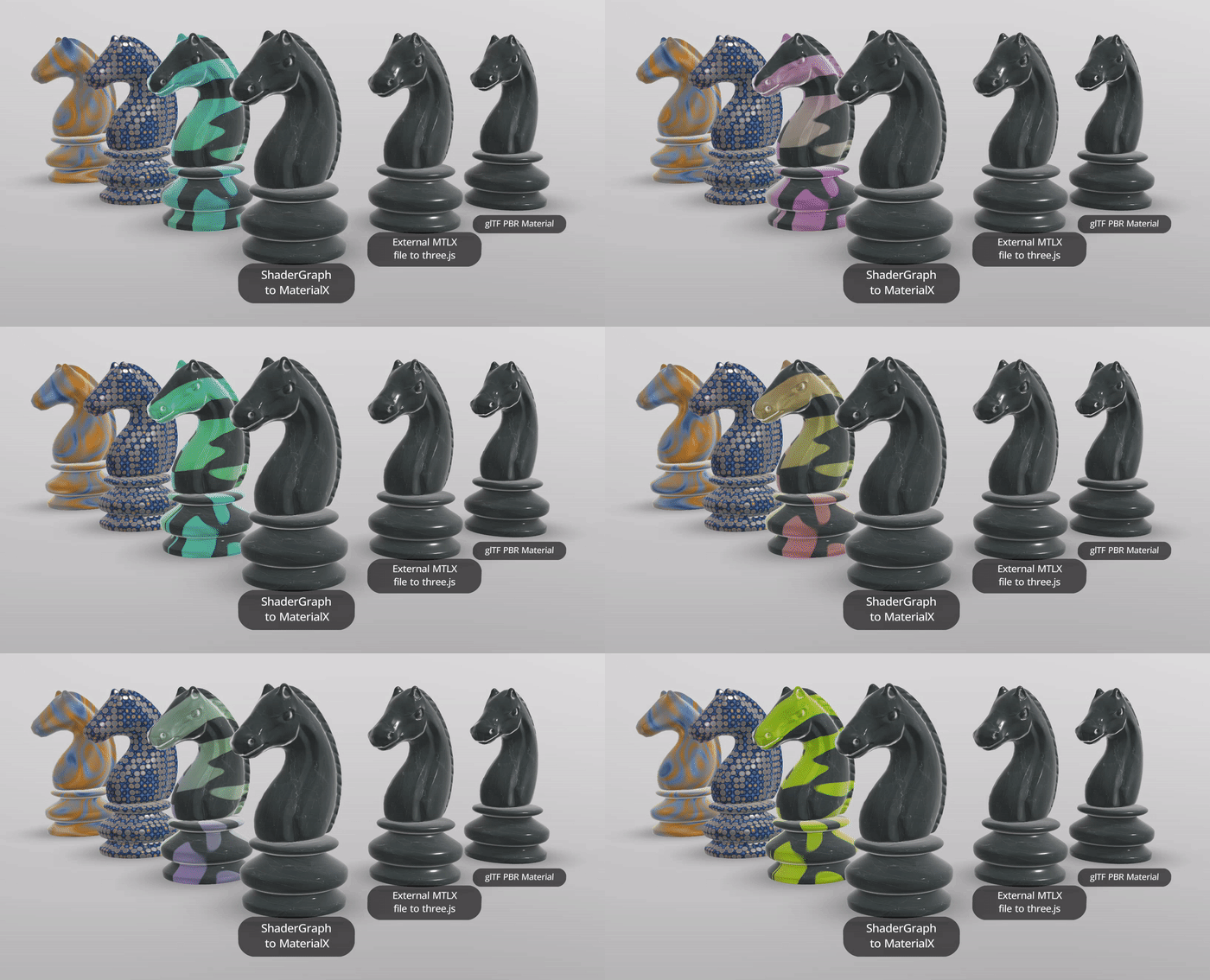
Watch a quick demo on YouTube →
Why MaterialX? Under the hood, Needle Engine converts your materials to MaterialX — the industry standard for portable material definitions. This means your materials are:
- High fidelity — rendered using the official MaterialX library, not an approximation
- Future-proof — ready for WebGPU and next-gen rendering
- Pipeline-compatible — the same format used by Maya, Houdini, V-Ray, and Omniverse
- Portable — based on an open industry standard used by Maya, Houdini, Unreal, and many more
- Open — load standard
.mtlxfiles from any exporter or authoring tool
Shader Graph to MaterialX requires a Pro, Edu or Enterprise plan.
The MaterialX Exporter is available for users on the Pro, Edu and Enterprise plans. See plans and pricing.
Already have MaterialX files from your studio pipeline? Needle Engine can load those too — see Using MaterialX files created externally.
MaterialX works out of the box in Needle Engine for Unity
MaterialX support is built into Needle Engine (since 4.13.0) — no setup, no extra packages. Just export your Shader Graph materials with the MaterialX export type and they work.
Not using Needle Engine?
You can also use our MaterialX package with vanilla three.js — see Using MaterialX with vanilla three.js.
Exporting materials with MaterialX support
Currently, MaterialX export is available for Unity's Shader Graph. Blender support is on our radar. If you have existing .mtlx files from other tools, see Using MaterialX files created externally.
Create materials with Unity's Shader Graph.
 Example of a complex Shader Graph in Unity.
Select an object that has a Shader Graph-based material in your scene, or select the shader asset in the Project View.
In the Material properties, find the section "Needle Engine – Custom Shader Settings", and select "MaterialX" as the Shader Export Type.
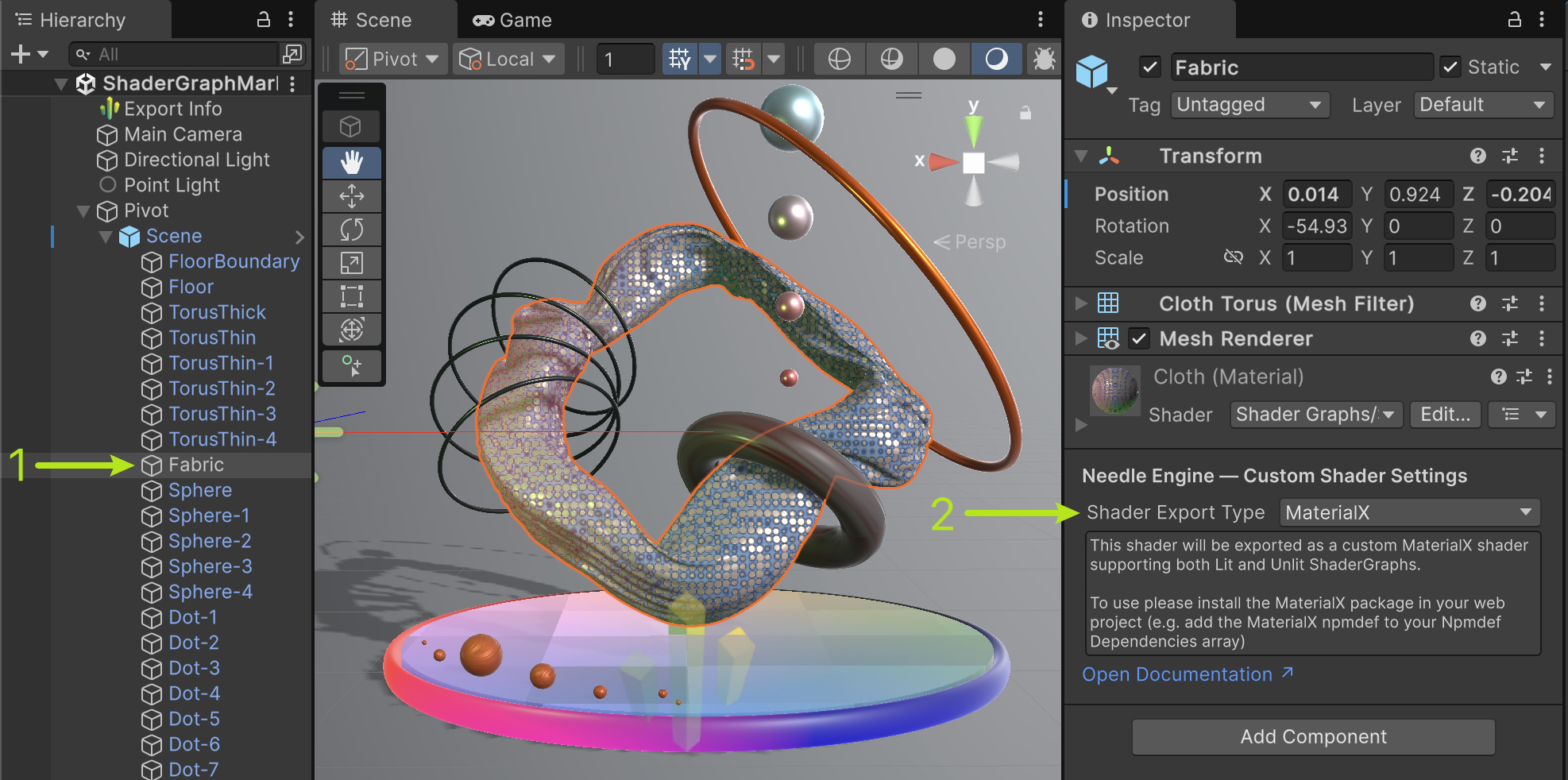 Enabling the MaterialX export type in the Shader Graph material properties.
When you export your scene, all materials using shaders with the "MaterialX" export type will be embedded alongside your 3D content, and loaded at runtime.
Using MaterialX files created externally
The Needle MaterialX package contains experimental support for loading MaterialX files directly. Textures can be resolved via a callback function, and materials are returned as three.js ShaderMaterial.
You can find examples for working with the Needle MaterialX package in our MaterialX collection on StackBlitz.
import { TextureLoader } from 'three';
import { Experimental_API } from '@needle-tools/materialx';

// Load a MaterialX file and its referenced textures from a URL
function load(mtlx_url) {
    const parts = mtlx_url.split('/');
    parts.pop();
    const dir = parts.join('/');

    return fetch(mtlx_url)
    .then((res) => res.text())
    .then((mtlx) => {
        const loader = new TextureLoader();
        const materialNameOrIndex = 0;
        Experimental_API.createMaterialXMaterial(mtlx, materialNameOrIndex, {
            getTexture: async (url) => {
                return await loader.loadAsync(dir + url);
            },
        }).then((mat) => {
            console.log("MaterialX material has been loaded:", mat);
        });
    });
}
Info
The Experimental_API.createMaterialXMaterial() method currently doesn't support loading multiple materials, or MaterialX files with additional .mtlx references.
Using MaterialX with vanilla three.js
You can use our MaterialX package in any three.js project, even if you're not using Needle Engine.
Install the MaterialX package:
npm install @needle-tools/materialxRegister our
MaterialXplugin with yourGLTFLoader:import { useNeedleMaterialX } from "@needle-tools/materialx"; import { GLTFLoader } from "three/examples/jsm/loaders/GLTFLoader.js"; const gltfLoader = new GLTFLoader(); // ... register other plugins such as DRACOLoader, KTX2Loader, etc. useNeedleMaterialX(gltfLoader); // ... load a file that contains MaterialX materials gltfLoader.load("https://cloud.needle.tools/-/assets/Z23hmXB2qfHiF-2qfHiF/file", (gltf) => { scene.add(gltf.scene); });Load GLB files that contain the
NEEDLE_materials_mtlxextension. The plugin will automatically load and apply the MaterialX materials to the objects that are using them.You can enable preloading of the MaterialX WebAssembly module by calling
useNeedleMaterialX(gltfLoader, { preload: true }). This will load the MaterialX WebAssembly module in advance, so that it is ready when you load a GLB file with MaterialX materials.
You can find a full example of how to use MaterialX in a three.js project on StackBlitz: MaterialX in three.js.
Supported Nodes and Features
Needle Engine supports the full MaterialX specification, including OpenPBR, Standard Surface, UsdPreviewSurface and Unlit Surface nodes, and including NPR (non-photorealistic rendering) nodes like fresnel effects. Nested nodegraph definitions and custom nodes are also supported.
MaterialX materials in Needle Engine support the following features:
- Image-Based Lighting (IBL) automatically coming from the scene's environment map
- Reflection Probes affect objects using MaterialX materials
- Light sources: Directional, point, and spot lights, with a current limit of 8 lights per scene
- Realtime shadows from directional, spot, and point lights New in Needle Engine 5
- Vertex displacement including procedural noise (fractal3d, position, math nodes) and texture-based displacement, with automatic normal recomputation via screen-space derivatives New in Needle Engine 5
- Displacement animation via animated material properties New in Needle Engine 5
- Alpha mode detection for mask and blend transparency New in Needle Engine 5
- Texture compression and progressive textures. MaterialX materials fully support the powerful texture compression and progressive loading features of Needle Engine, allowing you to use large textures. They will be only loaded when needed, and only in the resolution needed for the current view.
- Animated material properties for colors, floats, vectors. Same as other materials in Needle Engine, any numeric material property can be animated.
- All MaterialX surface models, including OpenPBR, Standard Surface, UsdPreviewSurface, and Unlit Surface.
The Needle MaterialX Exporter leverages the graph-based structure of Unity's Shader Graph for export, and converts Shader Graph nodes to MaterialX nodedefs and nodegraphs. It has support for the following features:
- Material properties like colors, floats, vectors, textures
- Operations on numbers, vectors, and matrices
- Blend nodes like Mix, Add, Multiply, and Blend with various blend modes
- Textures and color spaces
- Subgraphs with one or more levels of nesting
- Vertex colors are supported
- Vertex displacement via procedural noise or texture sampling
- Multiple UV channels are supported (up to 4)
- Shader Keywords are supported and will be exported as switch nodes in MaterialX.
Known MaterialX issue: texture colorspaces in subgraphs
The upstream MaterialX library currently has an open issue where texture samples inside nodegraphs/subgraphs can receive colorspace transforms at the wrong point, so a subgraph can render differently than an equivalent graph with the texture sample outside the subgraph. This is a MaterialX issue, not a Needle Engine-specific one; see AcademySoftwareFoundation/MaterialX#2353.
Until this is resolved upstream, we recommend avoiding color-sensitive texture sampling inside subgraphs. Prefer sampling the texture outside a subgraph.
ShaderGraph Node Coverage
Many nodes are supported out-of-the-box. We display a hint on unsupported nodes in the Shader Graph editor when a shader is set to export with MaterialX, so you can easily identify and fix any issues.
The following table shows all supported and currently not supported nodes in Shader Graph for MaterialX export.
TIP
When using an unsupported node in Shader Graph, the exporter will show a warning hint. You can replace the unsupported node with a supported alternative, or use the MATERIALX keyword to provide a fallback path.
Supported MaterialX Version
Needle Engine currently supports MaterialX version 1.39.4. MaterialX documents with earlier versions are also supported and will be automatically upgraded to the latest version.
Limitations of the MaterialX Exporter
Not all features that Shader Graph supports are also supported by MaterialX. If you attempt to export an unsupported node, the exporter will log an error and stop the export process. You can then fix the issue by replacing the unsupported node with a supported one, if possible.
- Baked Lightmaps: Baked lightmaps are currently not supported in MaterialX materials.
- Tangent space is not supported at the moment, which means that Shader Graph nodes specifying "Tangent" as space will look different.
- Code Nodes are not supported at the moment.
The special "MATERIALX" shader keyword
If you have complex shaders with unsupported nodes, you can use the "MATERIALX" keyword to prevent exporting them. The "On" path of keyword switches will be exported, and the "Off" path will be ignored for export. You can use this to keep shaders with custom nodes or unsupported features functional, but still export them to MaterialX.
Needle Engine vs built-in three.js MaterialX
Needle Engine uses the official MaterialX JavaScript library, which means materials are represented at the highest fidelity possible. three.js has some initial built-in MaterialX support, but its custom implementation doesn't yet cover many features of the standard.
Needle is contributing to the built-in three.js MaterialX support, so that at some point we can offer both options or switch to the three.js implementation once it's more comprehensive.
Comparison with PolySpatial
Unity's PolySpatial also exports Shader Graph materials to MaterialX, but produces non-standard MaterialX files that only work within the Apple ecosystem (visionOS). These files are not spec-compliant and cannot be used in other software or rendering engines.
Needle Engine produces fully spec-compliant MaterialX files following the official MaterialX specification. This means your exported materials work everywhere MaterialX is supported — across web, film, VFX, and e-commerce pipelines, and in tools like Autodesk Maya, Houdini, V-Ray, and Omniverse.
About MaterialX
MaterialX is an open standard for describing materials and shaders in a graph-based way, independent of any rendering engine. It allows you to define complex materials with multiple surface layers and realistic lighting in a portable format. Needle Engine uses the official MaterialX JavaScript library for maximum fidelity and exports fully spec-compliant files — validated against the official MaterialX Viewer and Graph Editor reference tools.
MaterialX is widely used across film, VFX, game engines, and e-commerce.
Compatible Software
| Software | Version | Notes |
|---|---|---|
| Autodesk Maya | 2024+ | Built-in LookdevX MaterialX plugin |
| Autodesk 3ds Max | 2024+ | Bundled MaterialX plugin |
| Autodesk VRED | 2024+ | MaterialX import |
| SideFX Houdini | 19+ | Native support via Solaris |
| Unreal Engine | 5.1+ | MaterialX import, USD workflows in 5.3+ |
| NVIDIA Omniverse | Kit 1.0.1+ | Import and rendering via MDL |
| Chaos V-Ray | 6+ | Support in Maya and Houdini |
| Pixar RenderMan | 24+ | Rendering via USD HdPrman |
| Autodesk Arnold | 5.1+ | Rendering via custom operator |
| Houdini Karma | — | Rendering in Karma CPU/XPU |
| Apple visionOS | — | Spatial computing |
For the full and up-to-date list, see the official MaterialX Third-Party Support page.
 Quick Tips for Unity
When working with MaterialX in Unity, here are some common scenarios and solutions:
How do I enable MaterialX for my material?
Select your Shader Graph material or shader asset, find the "Needle Engine – Custom Shader Settings" section in the Inspector, and set the Shader Export Type to MaterialX. That's it — the material will be exported as MaterialX automatically on the next export.
Shader Graph Not Available
Issue: Shader Graph package is not installed or visible in Unity.
Solution:
- Open Package Manager (Window > Package Manager)
- Change the filter to "Unity Registry" if needed
- Search for "Shader Graph" and install it
How do I export MaterialX from Unity?
- Make sure you've set the Shader Export Type to "MaterialX" in the material's Needle Engine settings
- Ensure you're using Needle Engine 4.13.0 or later (MaterialX is built-in)
- Check the Console for any export errors or unsupported nodes in your Shader Graph
Preview Looks Different in Unity vs Web
Issue: The material looks different between Unity's Scene view and the exported web version.
Solution:
- MaterialX uses physically-based rendering which may differ from Unity's preview
- Ensure your scene has proper lighting and an environment map/skybox for accurate IBL
- Some Shader Graph nodes (like tangent space operations) are not yet fully supported and may look different
Legacy setup for Needle Engine before 4.13.0
If you're on Needle Engine before 4.13.0, you need to add the @needle-tools/materialx package manually.
Unity: Select the Needle Engine component in your scene → find "NpmDef Dependencies" → increase the Size → pick the Needle MaterialX package.
Other integrations: Install via npm in your web project:
npm install @needle-tools/materialxSee Also
- Features Overview — full list of Needle Engine capabilities
- Progressive Loading — progressive textures and KTX2 compression, fully supported by MaterialX materials
- FastHDR Environment Lighting — high-quality environment maps for image-based lighting
- Optimization & Compression — texture compression and production build optimization
- Getting Started — get started with Needle Engine for Unity
- Unity Shader Graph Documentation — Unity's official Shader Graph reference